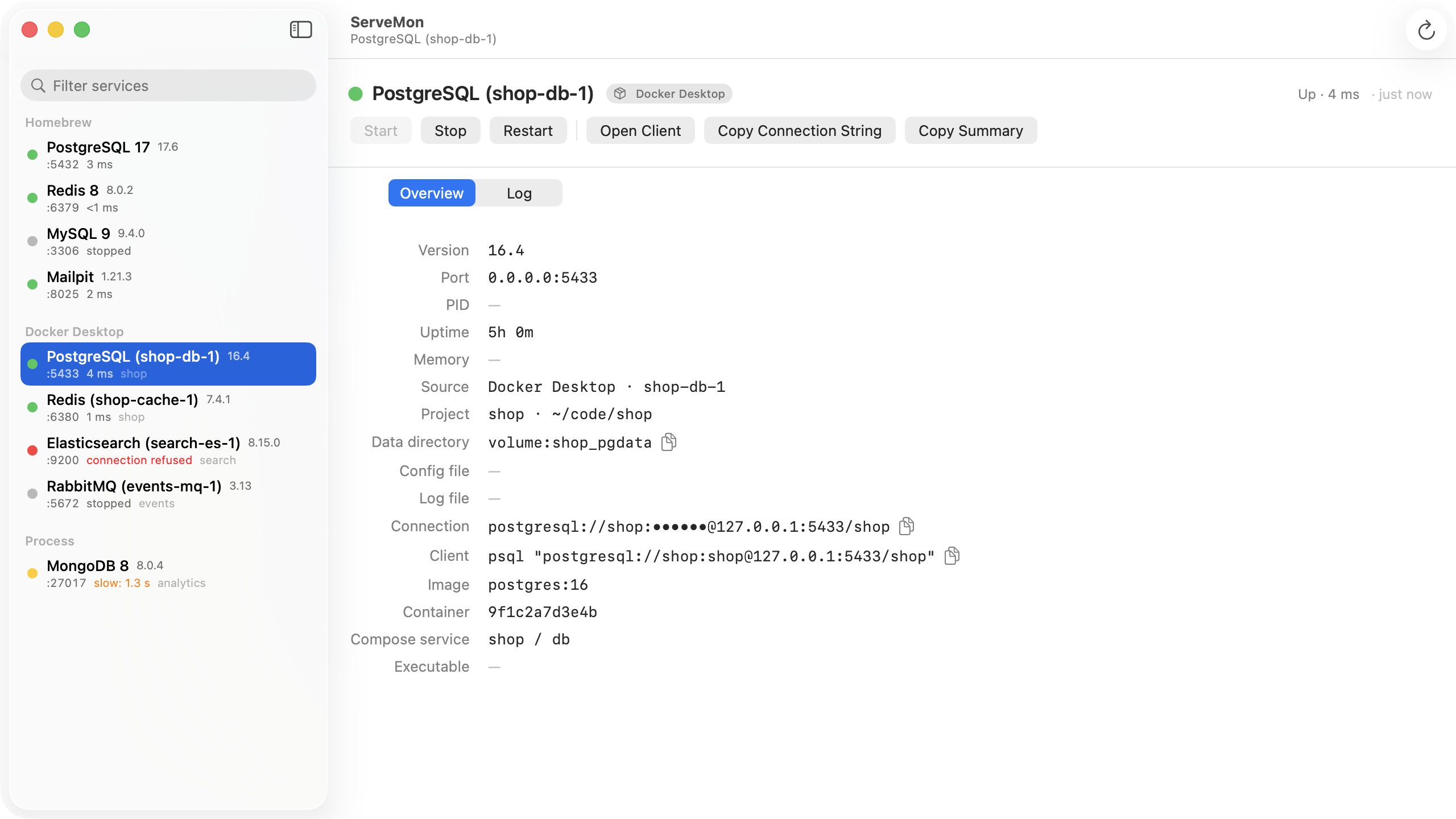
ServeMon
Upgrade Homebrew Postgres to a new major version (postgresql@16 to @17)
Homebrew ships each Postgres major version as its own formula, currently postgresql@14 through postgresql@18, and each one gets its own data directory, log, and service. A major version cannot open another major version's data directory, so moving from 16 to 17 means copying the data across with pg_upgrade or a dump and restore. Minor updates (17.5 to 17.6) need none of this; brew upgrade postgresql@17 and a restart are enough. Below, $(brew --prefix) is /opt/homebrew on Apple silicon and /usr/local on Intel.
What you have now
brew list --versions | grep postgresql
brew services list | grep postgresql
cat "$(brew --prefix)/var/postgresql@16/PG_VERSION"
which -a psql && psql --version
Each formula keeps its data in var/postgresql@<major> and logs to var/log/postgresql@<major>.log. Installing postgresql@17 runs initdb into var/postgresql@17, a fresh cluster with only the default databases, whose superuser is your macOS user name. Plain postgresql is an alias for the newest formula (postgresql@18 today). More on the paths in where the Postgres data directory is.
The PATH gotcha
postgresql@15 and later are keg-only: their psql, pg_dump, and pg_upgrade are not put in $(brew --prefix)/bin under their plain names. For 17 and 18, Homebrew does link versioned names there, psql-17, pg_dump-17, pg_upgrade-17, and so on, which is the least confusing way to run the commands below. Plain psql is whatever you set up earlier: a brew link postgresql@16, a PATH line in ~/.zshrc naming opt/postgresql@16/bin, or postgresql@14, which is not keg-only and links itself. After the upgrade, move that to 17, or plain psql and pg_dump keep running the old version. Either relink:
brew unlink postgresql@16 && brew link postgresql@17or change the PATH line in ~/.zshrc to:
export PATH="$(brew --prefix)/opt/postgresql@17/bin:$PATH"An old pg_dump against a newer server refuses with server version mismatch, which is usually the first sign the PATH was missed.
Route 1: dump and restore
The simplest route, and fine for most local databases. Run 17 on another port while you copy, then swap:
brew install postgresql@17
brew services start postgresql@16
LC_ALL=en_US.UTF-8 pg_ctl-17 -D "$(brew --prefix)/var/postgresql@17" -o '-p 5433' -l /tmp/pg17.log start
pg_dumpall-17 -p 5432 | psql-17 -p 5433 -d postgres
pg_ctl-17 -D "$(brew --prefix)/var/postgresql@17" stop
brew services stop postgresql@16
brew services start postgresql@17
Use the new version's pg_dumpall; the Postgres docs recommend it, because a newer dump program reads older servers but not the other way round. Expect one ERROR: role "you" already exists during the restore: your user was created by initdb on both sides, and the error is harmless. If you would rather keep a file, pg_dumpall-17 -p 5432 > ~/pg16.sql first and restore from it with psql-17 -d postgres -f ~/pg16.sql once 17 is the running service.
Route 2: pg_upgrade
Faster for large databases, because it moves the data files instead of replaying SQL. Both servers must be stopped, and the target must be the untouched cluster Homebrew just created:
brew install postgresql@17
brew services stop postgresql@16
brew services stop postgresql@17
pgrep -l postgres
cd ~
pg_upgrade-17 --check \
  -b "$(brew --prefix)/opt/postgresql@16/bin" -B "$(brew --prefix)/opt/postgresql@17/bin" \
  -d "$(brew --prefix)/var/postgresql@16" -D "$(brew --prefix)/var/postgresql@17"
pgrep should print nothing. --check changes nothing and ends with Clusters are compatible or a list of problems. The usual ones on a Mac:
- The new cluster is not empty, because you already started 17 and created databases in it. Move var/postgresql@17 aside and recreate it with initdb-17 --locale=en_US.UTF-8 -E UTF-8 "$(brew --prefix)/var/postgresql@17", the same flags Homebrew uses.
- A missing library: an extension such as PostGIS or pgvector installed for 16 but not for 17. Install it for 17 first.
- Locale or encoding differences, if you made the old cluster by hand. Recreate the new one to match.
Then run the same command without --check and with --clone:
pg_upgrade-17 --clone \
  -b "$(brew --prefix)/opt/postgresql@16/bin" -B "$(brew --prefix)/opt/postgresql@17/bin" \
  -d "$(brew --prefix)/var/postgresql@16" -D "$(brew --prefix)/var/postgresql@17"
brew services start postgresql@17
vacuumdb-17 --all --analyze-in-stages
--clone uses APFS clones, so it is about as fast as --link and takes little extra disk, but the old cluster stays usable if you need to go back. --link is the one to avoid unless you have a backup: once 17 has started on hard-linked files, 16 can no longer use its directory. pg_upgrade to 17 does not carry optimizer statistics over, which is what the vacuumdb line rebuilds. It also does not copy postgresql.conf or pg_hba.conf; diff the two data directories' copies and carry your changes across by hand.
Going to 18
Postgres 18's initdb turns data checksums on by default, so the cluster postgresql@18 creates has them and a cluster made by 16 or 17 does not. pg_upgrade requires the two to match and fails --check. Recreate the target with initdb-18 --no-data-checksums --locale=en_US.UTF-8 -E UTF-8, or dump and restore instead. pg_upgrade to 18 does carry most statistics over; its follow-up is vacuumdb-18 --all --analyze-in-stages --missing-stats-only.
Only one on 5432
Both formulae default to port 5432 and to a socket at /tmp/.s.PGSQL.5432. If both services are set to start at login, whichever starts second logs could not bind IPv4 address "127.0.0.1": Address already in use and exits, and it may be the new one. Stop the old service for good with brew services stop postgresql@16, then check which one answers:
psql -d postgres -c 'SHOW server_version;' -c 'SHOW data_directory;'Expect 17.x and var/postgresql@17. If you see 16, the old server is still on the port; two Postgres servers on the same port covers finding it.
Clean up, later
brew uninstall postgresql@16Uninstalling leaves var/postgresql@16 and its log in place; that directory is your rollback, so delete it by hand only after a few days on 17 (pg_upgrade also writes a delete_old_cluster.sh into the directory you ran it from). Before uninstalling, rebuild anything compiled against the old libpq, such as the pg gem or a source build of psycopg, or it will fail to load once the old keg is gone. Do not put off the upgrade itself for too long: Homebrew disables each versioned formula when the Postgres project stops supporting that major version, and postgresql@14 is already deprecated, due to be disabled in November 2026.
The easier way
ServeMon lists postgresql@16 and postgresql@17 as separate Homebrew services, stopped or running, each with its own data directory and log. The version comes from the running server's reply, so after the switch the one on 5432 says 17 or it does not. Start and Stop go through brew services, and the Log tab tails [email protected] if the new server refuses to start.