ServeMon
psql: error: connection to server on socket "/tmp/.s.PGSQL.5432" failed: No such file or directory
psql: error: connection to server on socket "/tmp/.s.PGSQL.5432" failed: No such file or directory
	Is the server running locally and accepting connections on that socket?
Run without -h, psql does not use the network. It opens a Unix socket file that a running server creates in /tmp, named after its port. No such file or directory means exactly that: the file is not there. The causes below are in order of likelihood. $(brew --prefix) is /opt/homebrew on Apple silicon and /usr/local on Intel.
See what is there
pg_isready
pgrep -l postgres
ls /tmp/.s.PGSQL.*
lsof -nP -iTCP:5432 -sTCP:LISTEN
pg_isready prints /tmp:5432 - no response when nothing answers on the socket. pgrep printing nothing means no native Postgres process exists at all. ls shows the socket files of every native server, so a .s.PGSQL.5433 there is a server on another port. lsof shows who holds TCP 5432, which may be Docker rather than postgres. More on reading these in check whether Postgres is running on a Mac.
1. Postgres is not running: start it
brew services list
brew services start postgresql@17
Homebrew's formulae are versioned, postgresql@14 through postgresql@18; use the name brew services list shows. A status of none means it was never started or was stopped; brew install does not start it for you. After starting it, run pg_isready again and expect accepting connections.
2. It dies on start: read the log
If brew services list shows error, or started while pgrep finds nothing, the server is exiting during startup. It says why in its log:
tail -n 30 "$(brew --prefix)/var/log/[email protected]"Two messages account for most cases.
FATAL:  lock file "postmaster.pid" already exists
HINT:  Is another postmaster (PID 612) running in data directory "/opt/homebrew/var/postgresql@17"?
This follows a crash, a forced power-off, or a full disk. Postgres clears a stale pid file on its own when the PID in it is dead; it gets stuck when, after the reboot, macOS has given that PID to some other process. Confirm no Postgres is running, and only then remove the file:
pgrep -l postgres
rm "$(brew --prefix)/var/postgresql@17/postmaster.pid"
brew services restart postgresql@17
If pgrep prints anything, stop. Removing the pid file under a live server lets a second one open the same data directory, and that corrupts it. lock file "postmaster.pid" already exists goes through the cases in detail, including the one where the PID belongs to some unrelated program.
FATAL:  database files are incompatible with server
DETAIL:  The data directory was initialized by PostgreSQL version 14, which is not compatible with this version 17.6.
The data directory belongs to an older major version. cat "$(brew --prefix)/var/postgresql@17/PG_VERSION" shows which. Do not delete the directory; it is your data. Install the old major next to the new one (brew install postgresql@14) and either start the old server, pg_dumpall from it, and restore into the new one, or run pg_upgrade with both servers stopped, into a new, empty cluster made by the new version's initdb. --check makes it a dry run (the full procedure is in upgrading Homebrew Postgres to a new major version):
pg_upgrade --check \
  -b "$(brew --prefix)/opt/postgresql@14/bin" -B "$(brew --prefix)/opt/postgresql@17/bin" \
  -d /path/to/old/data -D /path/to/new/data
Other log lines worth knowing: could not bind IPv4 address "127.0.0.1": Address already in use means another server has the port, and No space left on device means what it says.
3. It is running, on another port or in Docker
The socket file name includes the port. A server on 5433 creates /tmp/.s.PGSQL.5433, and psql looking for 5432 reports this error. Connect with psql -p 5433. Postgres.app also puts its sockets in /tmp, but its servers run only once you have started them in the app, and one set up while 5432 was taken may be on another port.
A Docker container never creates a socket on your Mac; the file lives inside the container. If lsof showed com.docker.backend or OrbStack on 5432, connect over TCP:
docker ps --format '{{.Names}}\t{{.Ports}}' | grep ':5432-'
psql -h 127.0.0.1 -p 5432 -U postgres
The official image's default user is postgres unless POSTGRES_USER says otherwise, and the port must be published with -p 5432:5432 or a Compose ports: entry. With Homebrew and Docker both installed, see two Postgres instances on the same port.
4. psql and the server come from different installs
which -a psql
psql --version
echo "$PGHOST $PGPORT"
The directory in the error message is compiled into the psql you ran. Homebrew and Postgres.app both use /tmp. If your error names another directory, such as /var/run/postgresql, that psql came from a different build, or PGHOST is set in your shell. Ask the running server where its socket is over TCP, then point psql at that directory:
psql -h 127.0.0.1 -c 'SHOW unix_socket_directories;'
psql -h /path/it/printed
-h with a leading slash is a socket directory, not a host name.
The easier way
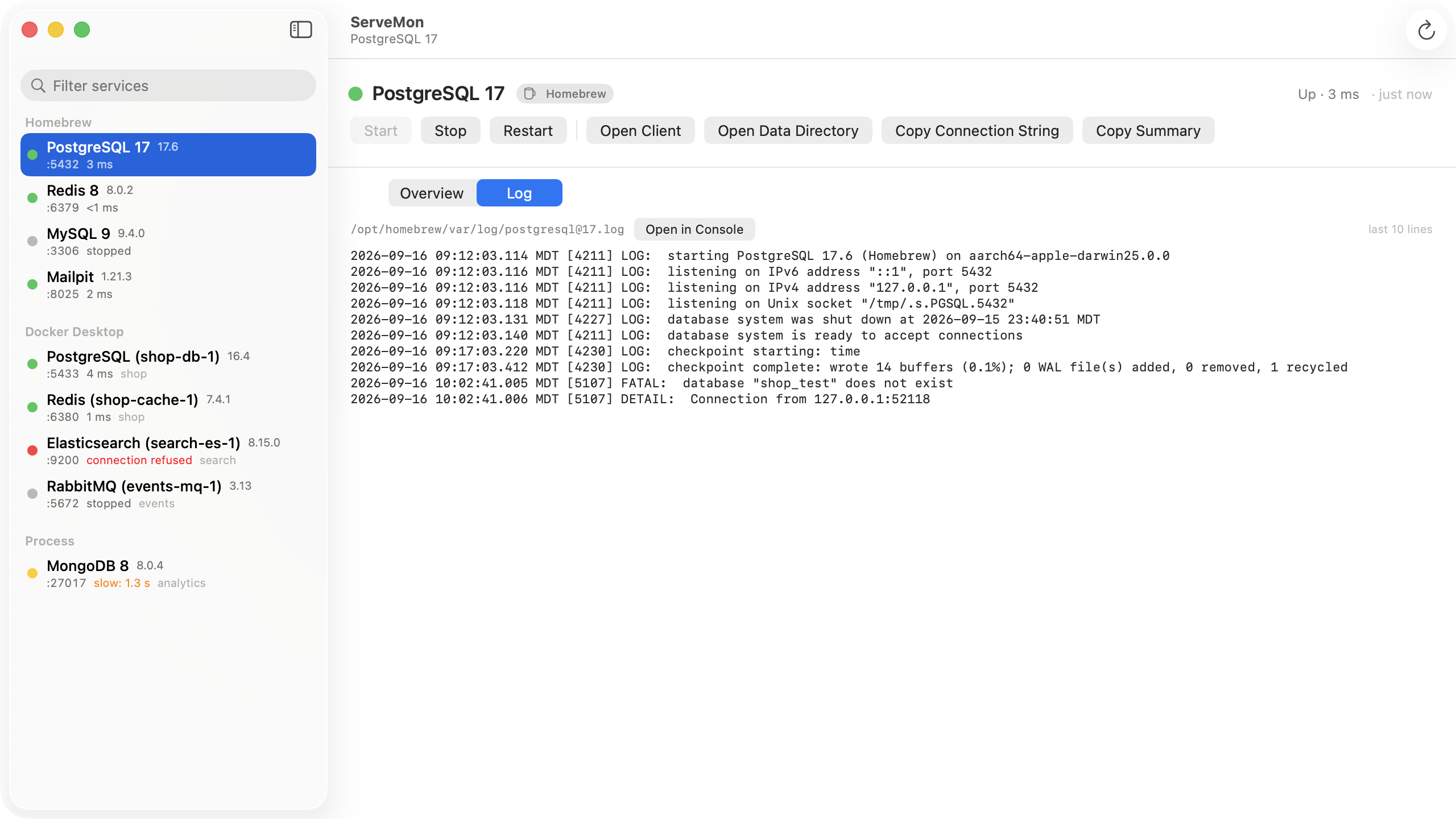
ServeMon lists every Postgres on the Mac in one place: Homebrew, Docker, Postgres.app, or a bare process. A stopped Homebrew service is in the list with a Start button, a container shows the host port it publishes, and for a Homebrew service the Log tab tails the same log file as the command above, so you read the FATAL lines without finding the path first.