ServeMon
FATAL: password authentication failed for user "postgres" on a Mac
psql: error: connection to server at "localhost" (::1), port 5432 failed: FATAL: password authentication failed for user "postgres"The short version: find out which server answered, read its log, and if it is a container, set the password from inside it:
lsof -nP -iTCP:5432 -sTCP:LISTEN
docker exec -it <container> psql -U postgres -c "ALTER USER postgres WITH PASSWORD 'postgres';"
Each step is explained below. A FATAL always comes from the server, so this is a different problem from connection to server on socket failed, where nothing answered. Below, postgresql@17 stands for whichever Homebrew version you installed. Everything on this page was checked with Homebrew's psql 17 against a postgres:17 container on Docker Desktop and a Homebrew-style cluster.
A default Homebrew Postgres never asks for a password
Homebrew creates its cluster with a plain initdb, which prints initdb: warning: enabling "trust" authentication for local connections. Its pg_hba.conf trusts the Unix socket, 127.0.0.1 and ::1. In our test, PGPASSWORD=nonsense psql -h 127.0.0.1 -d postgres logged straight in. So if you installed Postgres with Homebrew and never edited pg_hba.conf, this error did not come from it. It came from one of these:
- A Docker, OrbStack, Colima or Podman container. The current official image checks passwords (scram-sha-256) on every connection from outside the container.
- A server installed another way, such as the EDB installer from postgresql.org, which asks you to choose a postgres password during setup and checks it.
- A Homebrew cluster where someone switched trust to scram-sha-256 or md5. See the last section.
lsof -nP -iTCP:5432 -sTCP:LISTENpostgres in the COMMAND column is a native server; com.docker.backend (or OrbStack's or Colima's helper) is a container's published port. If you see both, two servers share the port and your app and psql may be reaching different ones: Homebrew Postgres and a Docker container both on 5432 sorts that out.
Read the server's side of it
The client message is deliberately vague. The server log says which pg_hba.conf line matched, and whether the user exists at all:
docker logs --tail 20 <container>FATAL: password authentication failed for user "postgres"
DETAIL: Connection matched file "/var/lib/postgresql/data/pg_hba.conf" line 128: "host all all all scram-sha-256"Postgres gives a client the same error for a wrong password and for a user that does not exist, so that nobody can probe for role names. Only the log tells them apart. In our test, connecting as bob printed password authentication failed for user "bob" in psql, and the log added DETAIL: Role "bob" does not exist. If that is your case, the password is not the problem: use the user from POSTGRES_USER, or postgres if it was never set. For a Homebrew server the log is $(brew --prefix)/var/log/[email protected].
POSTGRES_PASSWORD only counts the first time
This is the most common cause. The official image reads POSTGRES_PASSWORD, POSTGRES_USER and POSTGRES_DB only when it initializes an empty data directory. Change the password in docker-compose.yml later, recreate the container on the same volume, and the new value is ignored. The startup log says so:
PostgreSQL Database directory appears to contain a database; Skipping initializationIn our test, a container created with POSTGRES_PASSWORD=first and then recreated on the same volume with POSTGRES_PASSWORD=second rejected second and accepted first, while docker inspect showed POSTGRES_PASSWORD=second. The environment shows what the container was started with, not what the database holds. The same goes for a volume left over from another project that used the name postgres.
Two fixes. Keep the data and set the password from inside the container:
docker exec -it <container> psql -U postgres -c "ALTER USER postgres WITH PASSWORD 'postgres';"No password is needed for that. The image's pg_hba.conf trusts the socket and loopback inside the container; only connections from outside, which includes your Mac, use scram-sha-256. Use the user name from POSTGRES_USER if it was set. Or, if the data is disposable, delete the volume so the next start initializes again with the current values:
docker compose down -v
docker compose up -d
-v deletes the project's named volumes and every database in them. Run docker volume ls first if you are not sure which volume holds what.
Check the password your client actually sends
psql and every libpq-based client take the password from the first of these that has one: the connection string, PGPASSWORD, then ~/.pgpass (or the file PGPASSFILE names). A forgotten export PGPASSWORD in your shell profile or a stale ~/.pgpass line is easy to miss:
env | grep '^PG'
cat ~/.pgpass
When the password came from the file, psql says so under the error: password retrieved from file "/Users/you/.pgpass". A password in the URL beats both. If none of them has a password, psql prompts for one, and a client that cannot prompt fails with a different error: fe_sendauth: no password supplied.
Special characters in a URL password need percent-encoding. With the password p@ss#1, postgresql://postgres:p@ss#[email protected]:5432/postgres is read as a host name, and psql fails with could not translate host name "ss#[email protected]" to address. Encode it:
python3 -c "from urllib.parse import quote; print(quote('p@ss#1', safe=''))"That prints p%40ss%231, and postgresql://postgres:p%40ss%[email protected]:5432/postgres connected in our test. Or use a password without @ : / # ? for local development.
Homebrew with passwords turned on
If you changed your Homebrew pg_hba.conf to check passwords and no longer know one, switch the socket line back to trust for a minute:
grep -v '^#' "$(brew --prefix)/var/postgresql@17/pg_hba.conf" | grep -v '^$'Edit the local all all line to end in trust, then:
brew services restart postgresql@17
psql -d postgres -c "ALTER ROLE postgres PASSWORD 'new-password';"
Put the line back the way it was and restart again. If psql -d postgres now says role "you" does not exist, add -U with a role that does; role "postgres" does not exist covers the role side.
The easier way
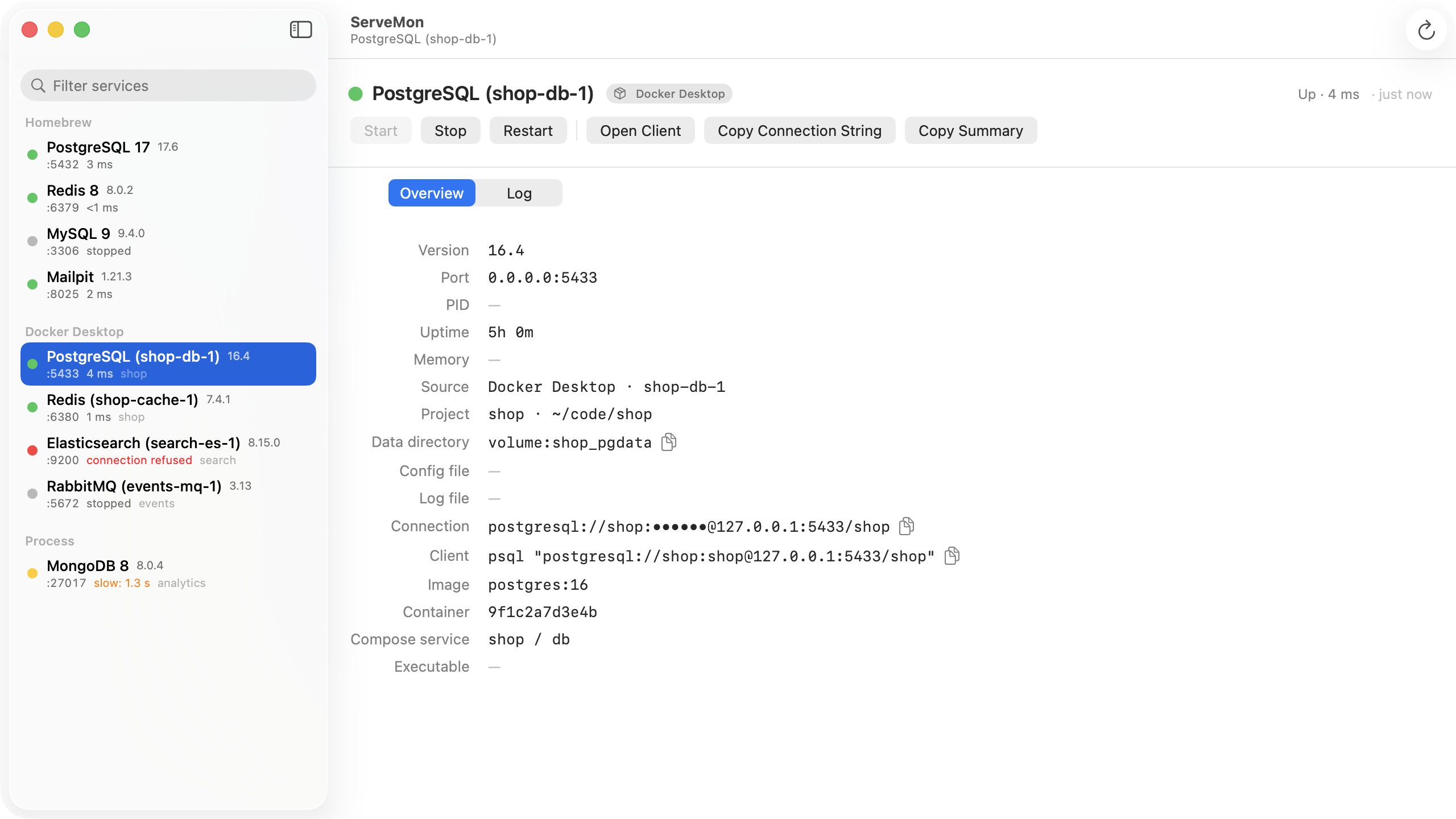
ServeMon lists every Postgres on your Mac with a badge for where it came from, Homebrew, Postgres.app, Docker Desktop, OrbStack, Colima or Podman, and the port each one holds, so you can see which server your error came from. Its health check counts a server that asks for a password as up, so a green dot next to this error means the server is fine and the credentials are wrong. For a container, the connection string uses POSTGRES_USER, POSTGRES_PASSWORD and POSTGRES_DB from the container's environment, and the Log tab shows the container's log with the FATAL and DETAIL lines above. If the volume was initialized with an older password, that environment value is stale too, as described above.