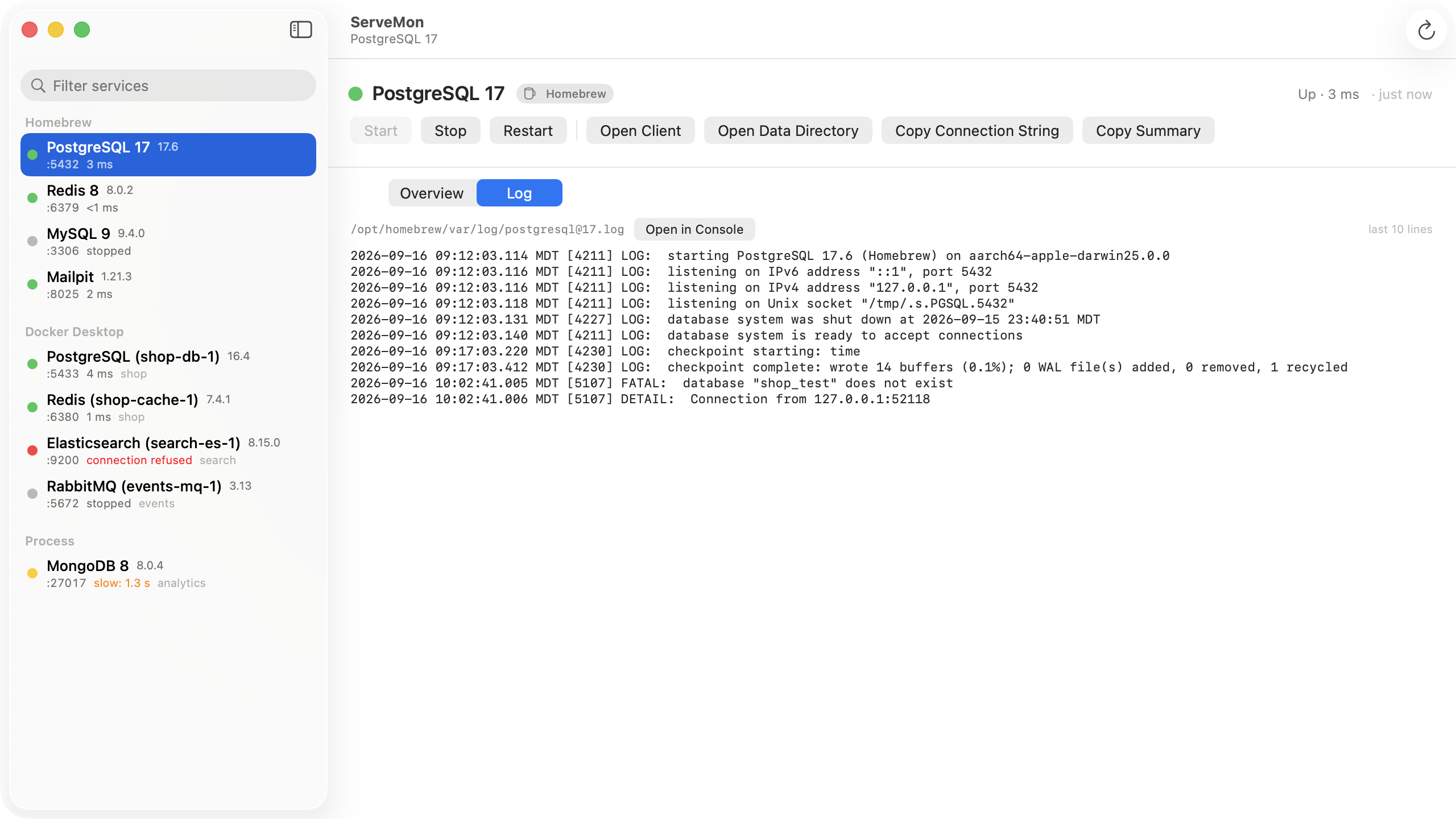
ServeMon
FATAL: lock file "postmaster.pid" already exists with Postgres on a Mac
pg_ctl: another server might be running; trying to start server anyway
waiting for server to start.... stopped waiting
pg_ctl: could not start server
Examine the log output.
FATAL: lock file "postmaster.pid" already exists
HINT: Is another postmaster (PID 59002) running in data directory "/opt/homebrew/var/postgresql@17"?The short version: look up the PID from the HINT before you touch the file.
ps -o pid,user,comm -p "$(head -1 "$(brew --prefix)/var/postgresql@17/postmaster.pid")"If that prints a postgres process, a server is already running on this data directory and you are starting a second copy. Stop one of them, or use the one that is running. If it prints some unrelated program, or nothing, the file is stale and you can remove it. Below, postgresql@17 stands for whichever Homebrew version you installed, and $(brew --prefix) is /opt/homebrew on Apple silicon and /usr/local on Intel. Everything on this page was checked with Homebrew's PostgreSQL 17.10 on macOS 26.
What the file is
postmaster.pid lives at the top of the data directory. The server writes it on startup and deletes it on a clean shutdown. The first line is the PID of the postmaster; the rest is the data directory, the start time, the port, the socket directory, the listen address, the shared memory key and the status:
59002
/opt/homebrew/var/postgresql@17
1791499132
5432
/tmp
localhost
192253899   7208960
ready
On startup, if the file exists, Postgres reads the PID and checks whether that process is alive. Two outcomes:
- The PID is dead. Postgres removes the file on its own and starts, running crash recovery first. In our test, after killing the postmaster with kill -9 and starting again, the log said database system was not properly shut down; automatic recovery in progress and the server came up. So a crash, a forced power-off, or closing the lid at the wrong moment does not normally produce this error. Older answers that say to delete the pid file after every crash are describing a problem Postgres fixed years ago.
- The PID is alive. Postgres refuses to start with the FATAL above. It cannot tell whether that process is another postmaster or an unrelated program that was handed the same PID number after a reboot, so it stops and asks you.
The pg_ctl: another server might be running; trying to start server anyway line is not an error. pg_ctl prints it whenever the file exists, including the stale case, and then hands the decision to the server. In our test it printed that line and then server started when the PID was dead.
Check what the PID is
ps answers in one line. Use the PID from the HINT, or read the first line of the file:
PIDFILE="$(brew --prefix)/var/postgresql@17/postmaster.pid"
head -1 "$PIDFILE"
ps -o pid,user,comm,args -p "$(head -1 "$PIDFILE")"
pgrep -fl 'postgres -D'
brew services list
Three things can come back.
A postgres process with the same data directory in its arguments. This is the common case, and nothing is stale: the server is running and you started it twice. On a Mac that is usually a mix of managers. brew services start postgresql@17 runs the server under launchd and brew services list shows it as started; running pg_ctl start or postgres -D on top of that fails with this error. The other order happens too: a postgres -D left in a terminal tab is running, so the Homebrew service fails every time launchd starts it, and because the plist has KeepAlive set, launchd keeps retrying and the log fills with the same FATAL line. Pick one manager and stop the other with its own command: pg_ctl -D ... stop for a manual start, brew services stop postgresql@17 for the service, or quit Postgres.app. Do not delete the file in this case. Removing the pid file under a live server lets a second one open the same data directory, and that corrupts it.
Something that is not Postgres. After a reboot, macOS hands out PIDs from a low number again, so the number in a file from before the reboot can belong to anything: a browser helper, a sleep, a build tool. In our test, writing the PID of a running sleep into the file reproduced the error exactly. pgrep -fl 'postgres -D' prints nothing, so no server has the directory. Remove the file and start:
pgrep -fl 'postgres -D' || rm "$(brew --prefix)/var/postgresql@17/postmaster.pid"
brew services start postgresql@17
The || only runs the rm when pgrep found nothing, which is the check you want to make anyway.
Nothing. A dead PID is one Postgres clears by itself, so the FATAL you are reading is probably from an earlier start and the current failure is a different line further down the log:
tail -n 40 "$(brew --prefix)/var/log/[email protected]"could not bind IPv4 address "127.0.0.1": Address already in use means another server has port 5432, often a Docker container; see Homebrew Postgres and a Docker container both on 5432. database files are incompatible with server and the other start-up failures are covered in connection to server on socket failed. One more message belongs to this family:
FATAL:  pre-existing shared memory block (key 192253899, ID 7208960) is still in use
HINT:  Terminate any old server processes associated with data directory "/opt/homebrew/var/postgresql@17".
The postmaster died but some of its child processes did not. ps ax | grep '[p]ostgres:' lists them (checkpointer, walwriter, background writer, and any client backends). They are yours, so kill them by PID and start again.
Postgres.app
Postgres.app keeps each server's data directory under ~/Library/Application Support/Postgres/, for example var-17, with the same postmaster.pid inside. The checks are the same with that path, and its own pg_ctl reports status for it:
D="$HOME/Library/Application Support/Postgres/var-17"
/Applications/Postgres.app/Contents/Versions/17/bin/pg_ctl -D "$D" status
ps -o pid,user,comm -p "$(head -1 "$D/postmaster.pid")"
If the PID is unrelated, quit Postgres.app so it is not retrying, remove the file, and open the app again.
Docker
In the official image, postgres runs as PID 1 inside the container, and the pid file in the volume records that. A new server skips the check when the PID in the file is its own, so a container that was killed or that came back after a reboot starts cleanly. If you do see the error in docker logs, two containers are opening the same volume; docker ps shows them, stop one. Only if no container is running and the file is still in the way, remove it with a one-off container on the same volume:
docker compose stop db
docker run --rm -v myproject_pgdata:/var/lib/postgresql/data alpine rm /var/lib/postgresql/data/postmaster.pid
docker compose up -d db
docker volume ls gives the volume name; it is the compose project name plus the volume key.
The easier way
ServeMon lists every Postgres on the Mac with a badge for where it came from, so a Homebrew service and a bare postgres -D process started by hand show up as two entries, each with its data directory and PID in the Overview. That is the double-start case made visible: two rows pointing at one directory. For a Homebrew service the Log tab tails [email protected], so the FATAL and HINT lines, and whatever follows them, are one click away. Start and Stop go through brew services, the same launchd job as the command line, not a second copy of the server.