ServeMon
psql or redis-cli hangs with no error: a server suspended with Ctrl+Z
zsh: suspended redis-server /opt/homebrew/etc/redis.confThat line, scrolled out of sight in some terminal tab, is the whole story. Ctrl+Z does not stop a program the way Ctrl+C does; it pauses it. A paused server keeps its listening socket, so the port is taken and new connections go through, but nothing reads them. psql, redis-cli and your app wait, with no error. The short version, in the tab where the server was started:
jobs -l
fg
then Ctrl+C to shut it down the way you meant to. From any other tab, find it by port, resume it, and send the same Ctrl+C signal:
PID=$(lsof -nP -iTCP:6379 -sTCP:LISTEN -t)
ps -o stat= -p $PID
kill -CONT $PID
kill -INT $PID
Each step is explained below. Everything on this page was checked on macOS 27 with zsh 5.9, the default shell, using a small Python server on a high port in place of the database. The pause, the hang and the cleanup are done by the shell and the kernel, not by the server, so they come out the same for redis-server, postgres or mongod. What each server does with a signal comes from its own documentation, linked below.
How a server ends up suspended
Homebrew's own instructions offer a foreground run. brew info redis and brew info postgresql@17 end with Or, if you don't want/need a background service you can just run: and then:
/opt/homebrew/opt/redis/bin/redis-server /opt/homebrew/etc/redis.conf
LC_ALL="en_US.UTF-8" /opt/homebrew/opt/postgresql@17/bin/postgres -D /opt/homebrew/var/postgresql@17
That ties the server to the tab. Press Ctrl+Z there, out of habit or to get a prompt back, and the terminal sends SIGTSTP to the job, the server stops running, and zsh prints zsh: suspended followed by the command line you typed. Then you open another tab, or the line scrolls away, and an hour later nothing answers. A server started with brew services, Postgres.app or Docker has no terminal and cannot be suspended this way; this only happens to one you ran by hand.
What a suspended server looks like
A port check says everything is fine. A real request waits until something gives up. With the paused test server on port 49321 and nothing at all on 49322:
nc -z -G 2 127.0.0.1 49321
curl -m 3 http://127.0.0.1:49321/
curl -m 3 http://127.0.0.1:49322/
Connection to 127.0.0.1 port 49321 [tcp/*] succeeded!
curl: (28) Operation timed out after 3005 milliseconds with 0 bytes received
curl: (7) Failed to connect to 127.0.0.1 port 49322 after 0 ms: Couldn't connect to serverThe kernel completes the TCP handshake on the server's behalf and queues the connection; reading it and replying is the server's job, and the server is paused. So the two failures look different: refused at once means no server is listening (see Redis connection refused), and a hang means a server holds the port and is not answering. On a development Mac the second is very often this.
How long each client waits depends on its timeout. psql uses libpq's connect_timeout, and the libpq docs say Zero, negative, or not specified means wait indefinitely, so psql sits there until you press Ctrl+C. pg_isready gives up after 3 seconds by default and exits with status 2, no response. redis-cli's -t option is a timeout for making the connection, and that part succeeds.
Starting a second copy fails too, because the paused one still owns the port. A Redis started with brew services start redis cannot bind and exits with Address already in use in its log, which is the case in brew services says started but the service is not running. A second Postgres on the same data directory stops at lock file "postmaster.pid" already exists.
Find it
If you know the tab, jobs -l there lists the job with its number and PID, in the form [1] + 12010 suspended python3 -m http.server 49321 --bind 127.0.0.1. If you do not, ask by port. lsof lists a paused server exactly like a running one, so it tells you the PID but not the state; ps tells you the state:
lsof -nP -iTCP:6379 -sTCP:LISTEN
ps -o pid,stat,command -p "$(lsof -nP -iTCP:6379 -sTCP:LISTEN -t)"
A STAT that starts with T means stopped; a running server shows S (sleeping, waiting for work) or R. The letters after the first one are unrelated flags. Use port 5432 for Postgres, 27017 for MongoDB. To list every stopped process on the Mac, from every tab:
ps -axo pid,stat,command | awk 'NR==1 || $2 ~ /^T/'Stop it or resume it
In its own tab. fg resumes the job in the foreground, and zsh prints [1] + continued with the command. Connections that were waiting are answered. Press Ctrl+C to shut it down, which sends SIGINT: Postgres treats that as a fast shutdown, and Redis as a graceful one that saves the RDB file if persistence is configured (Redis signal handling). bg instead lets it keep running in the background of that tab. kill %1 works as well, because zsh's kill sends a stopped job CONT along with the signal.
From another tab. A plain kill $PID is not enough here. It sends SIGTERM and nothing else, and a server that handles SIGTERM itself, as Postgres and Redis both do, cannot run its handler while it is stopped. In our test a server with a SIGTERM handler was still in state T after kill, and shut down the moment it got kill -CONT. So resume it first, then signal it:
kill -CONT $PID
kill -INT $PID
-INT is what Ctrl+C would have sent. For Postgres it is better than the default -TERM, which is the smart shutdown that waits for every open session to end. Skip kill -9: Postgres has to replay its WAL on the next start, and Redis loses whatever was written since its last save. If you only want the server back, kill -CONT $PID on its own is enough; it carries on in the background of its original tab.
Closing the tab. exit with a suspended job prints zsh: you have suspended jobs. and stays open. Type exit again and, per the zsh manual, the suspended jobs are terminated, which is not the clean shutdown above. Stop the server with fg and Ctrl+C first.
To keep it from happening again, run the server as a service, brew services start redis, so it has no terminal to be paused from, or keep the foreground habit to Ctrl+C.
The easier way
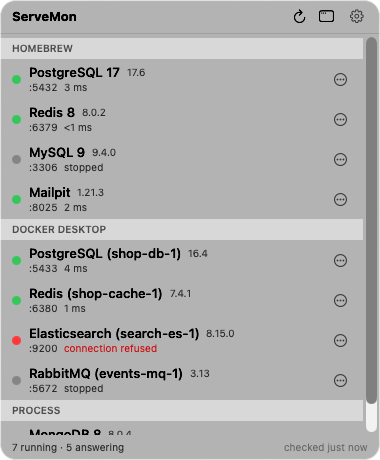
ServeMon lists a server you started from a terminal under Process, with its PID and port, next to the Homebrew services and containers. Its probe connects and waits for the protocol reply, so a suspended server gets a red dot with timed out under its name: the process is there and the port took the connection, but nothing answered within the probe's 1.5 seconds. A port with no server reads connection refused instead, so the two cases do not look alike. Resume a suspended server with kill -CONT before you use Stop on its row: Stop sends SIGTERM, then SIGKILL after five seconds, and a paused server can only act on the second.