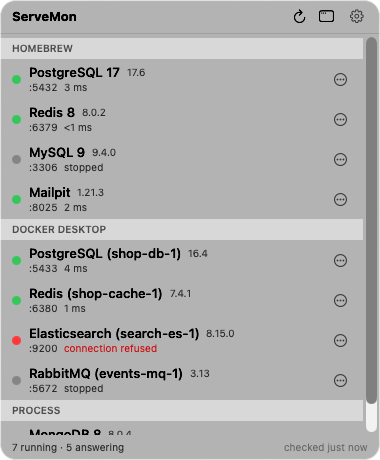
ServeMon
Which local service is Docker, Homebrew, or a bare binary
The usual state of a developer Mac: a Homebrew Postgres from last year, a Compose stack with its own Postgres and Redis, and a Kafka someone told you to untar. When something on 6379 is not the Redis you think it is, this is how to sort them out.
Start from the port
lsof -nP -iTCP -sTCP:LISTEN | grep -E ':(5432|6379|3306|27017|9200|5672|9092)\b'Add or remove ports as needed. Each line gives a COMMAND and a PID. Sort the lines into two piles:
- postgres, redis-server, mysqld, mongod, java: a native process. Go to the next section.
- com.docker.backend (Docker Desktop) or the helper process of OrbStack, Colima, or Podman: a container. The database is inside a VM; the runtime holds the port for it. Go to the Docker section.
Native: read the path
ps -o pid,etime,args -p 12345Replace 12345 with the PID. The first token of args is the executable:
| Path starts with | Source | Stop it with |
|---|---|---|
| /opt/homebrew/opt/ or /opt/homebrew/Cellar/ (/usr/local/ on Intel) | Homebrew | brew services stop <formula> |
| /Applications/Postgres.app/ | Postgres.app | The Postgres.app window |
| Anything else: ~/tools/, /usr/local/kafka/, a build directory | A bare binary someone started by hand | kill <pid>, then find out what started it |
The rest of args has the data directory (-D for Postgres, --datadir for MySQL, the .conf path for Redis), and etime tells you how long it has been up. For a Homebrew binary, brew services list confirms whether launchd manages it or someone ran it from a shell.
Docker: match the port to a container
docker ps --format 'table {{.Names}}\t{{.Image}}\t{{.Ports}}\t{{.Label "com.docker.compose.project"}}'The Ports column maps host ports to container ports, and the Compose project label says which repo's compose.yaml started it. To find the container holding one host port, search that column: docker ps --format '{{.Names}}\t{{.Ports}}' | grep ':5432-'. (--filter publish=5432 is meant to do the same and matches nothing on some Docker versions.) The same command works against OrbStack, Colima, and Podman as long as your docker context points at them (docker context ls).
docker inspect -f '{{.Config.WorkingDir}} {{index .Config.Labels "com.docker.compose.project.working_dir"}}' shop-db-1That prints the directory the Compose file lives in, which is usually the project you were looking for.
Why it matters
Each source has its own way to start, stop, read logs, and find data. A Homebrew Redis logs to /opt/homebrew/var/log/redis.log; a container logs to docker logs; a bare binary logs wherever its author decided. Stopping the wrong one leaves the port held and the confusion intact, and brew services list only ever sees the first pile.
Homebrew's view
brew services list
brew services info redis
brew list --versions postgresql@17 redis mysql
brew services list shows only the first pile, and only the formulas that ship a launchd plist. A Homebrew binary someone ran from a shell shows as none there while it is very much running; a service brew thinks is started may have crashed. Use it to learn what is installed and what launchd manages, and trust lsof for what is actually on the port. brew list --versions gives you the installed version without connecting, which matters when the server refuses connections.
The launchd job is named homebrew.mxcl.<formula>; its plist in ~/Library/LaunchAgents records the exact command line, data directory, and log path Homebrew started the service with.
The easier way
ServeMon does exactly this sort, continuously, and shows the result as a badge on every service: Homebrew with the formula, Docker Desktop, OrbStack, Colima, or Podman with the container and image, Postgres.app, or Process with the executable path. Start and Stop use the matching mechanism, and the Compose project or git repository is a line in the details.